RECAP UI Screenshot QA

Generated 08/11/2026 14:53:22 · Branch fix/043-small-screen-spacing · Commit b9e2dcf
Host Screenshot QA VM/System Insets Not Verified Scope: HOST_SCREENSHOT_ONLY

Summary

6
Modules audited
360
Screenshots inspected
6
Total issues
0
Critical
6
Major
0
Minor
0
Blocked modules

Coverage

ModuleStatusPreviewTestsExpectedInspectedIssues
onboardingFAIL981813
settingsFAIL872721
screenshotPASS545450
organizeFAIL763631
homePASS654540
collectionFAIL545451

Issues (6)

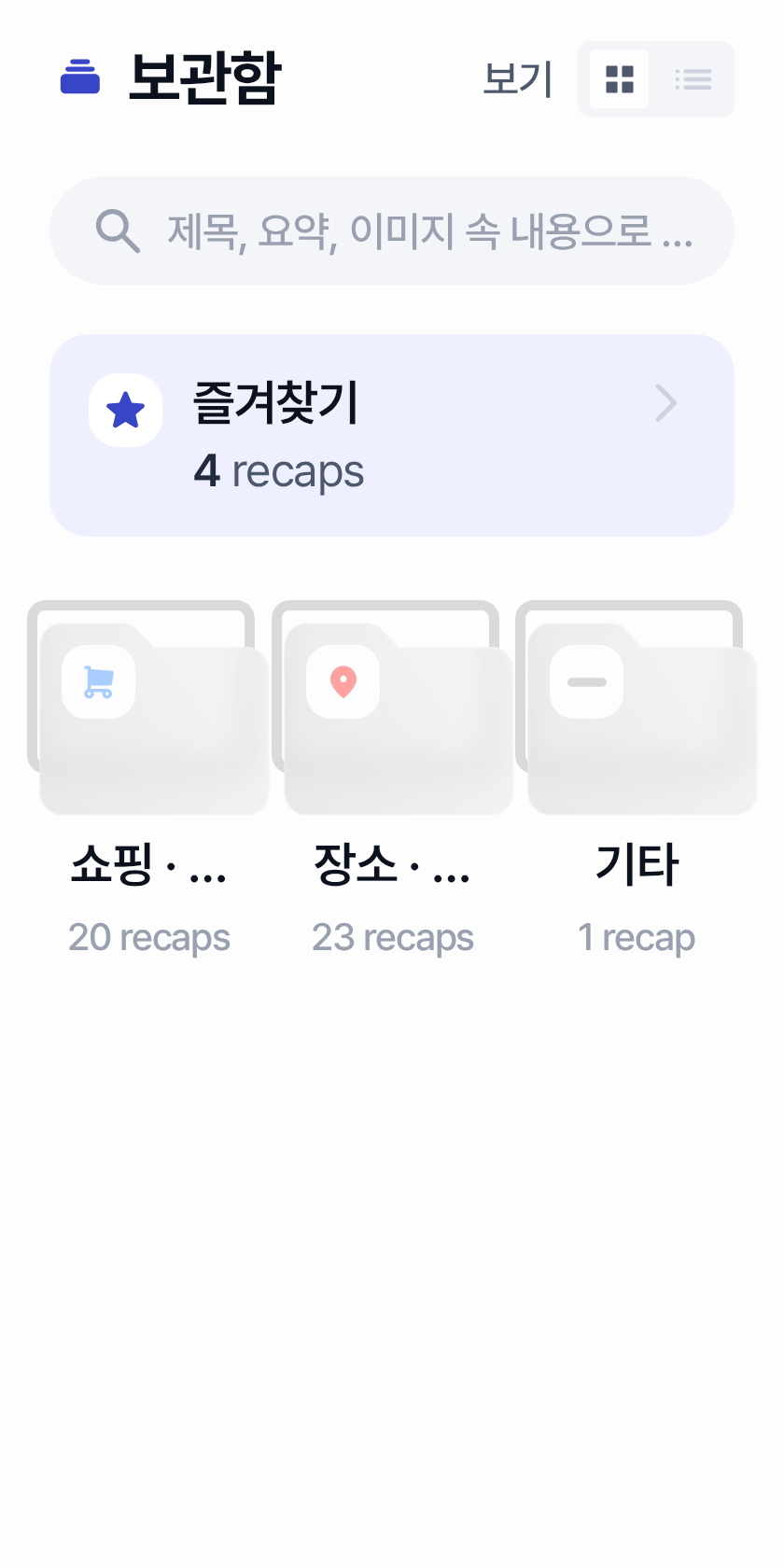
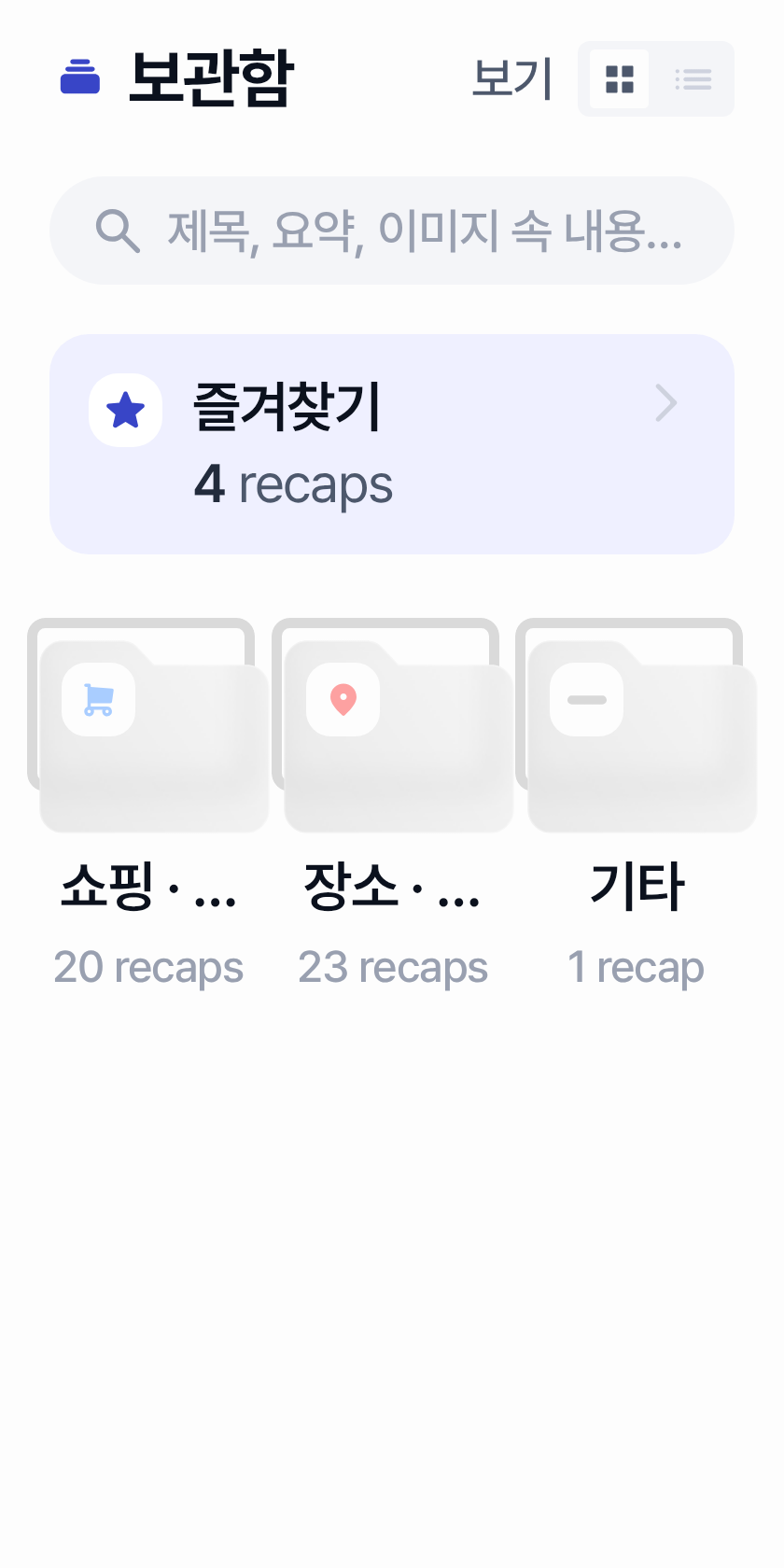
MAJOR CLIPPING collection-001 collection / CollectionScreen Category grid labels ellipsize under compact width / high fontScale

In Overview Grid mode, fixed 3-column category cells force single-line category titles such as '쇼핑 · 상품' and '장소 · 맛집' into ellipsis (e.g. '쇼핑 · ...', '장소 · ...'), so primary category identity becomes unreadable while the folder icons remain.

State Overview Grid (populated categories)
Test com.chalkak.recap.feature.collection.CollectionScreenOverviewGridScreenshot
Components CollectionTypeGridItem, LazyVerticalGrid GridCells.Fixed(3), RecapHeading3 category label, collection_recap_count plural
Root cause file feature/collection/src/main/java/com/chalkak/recap/feature/collection/CollectionScreen.kt
Probable root cause Fixed 3-column grid cell width plus single-line ellipsis on scaled RecapHeading3/Caption2 text cannot fit multi-token category labels without allowing wrap, adaptive columns, or a denser typography/layout contract.
Fix layer SCREEN · Confidence HIGH · VM confirmation False

Evidence

  • 320x640 @ font130/150: category titles truncated to '쇼핑 · ...' and '장소 · ...' while '기타' remains fully visible.
  • 320x640 @ font100 and 360/412 at font100-150 keep full '쇼핑 · 상품' / '장소 · 맛집' / count strings.
  • Source: CollectionTypeGridItem uses maxLines=1 + TextOverflow.Ellipsis for label and count under LazyVerticalGrid(columns = GridCells.Fixed(3)) with HorizontalPadding 20.dp and TypeGridSpacing 19.dp (~80.7dp cell width at 320dp).

Failing screenshots
collection-001 320x640-font150
Most severe failing · 320x640-font150 · 320x640 · fontScale 1.5
collection-001 320x640-font130
Boundary (issue begins) · 320x640-font130 · 320x640 · fontScale 1.3
collection-001 healthy
Healthy comparison

All occurrence previews: 320x640-font130, 320x640-font150
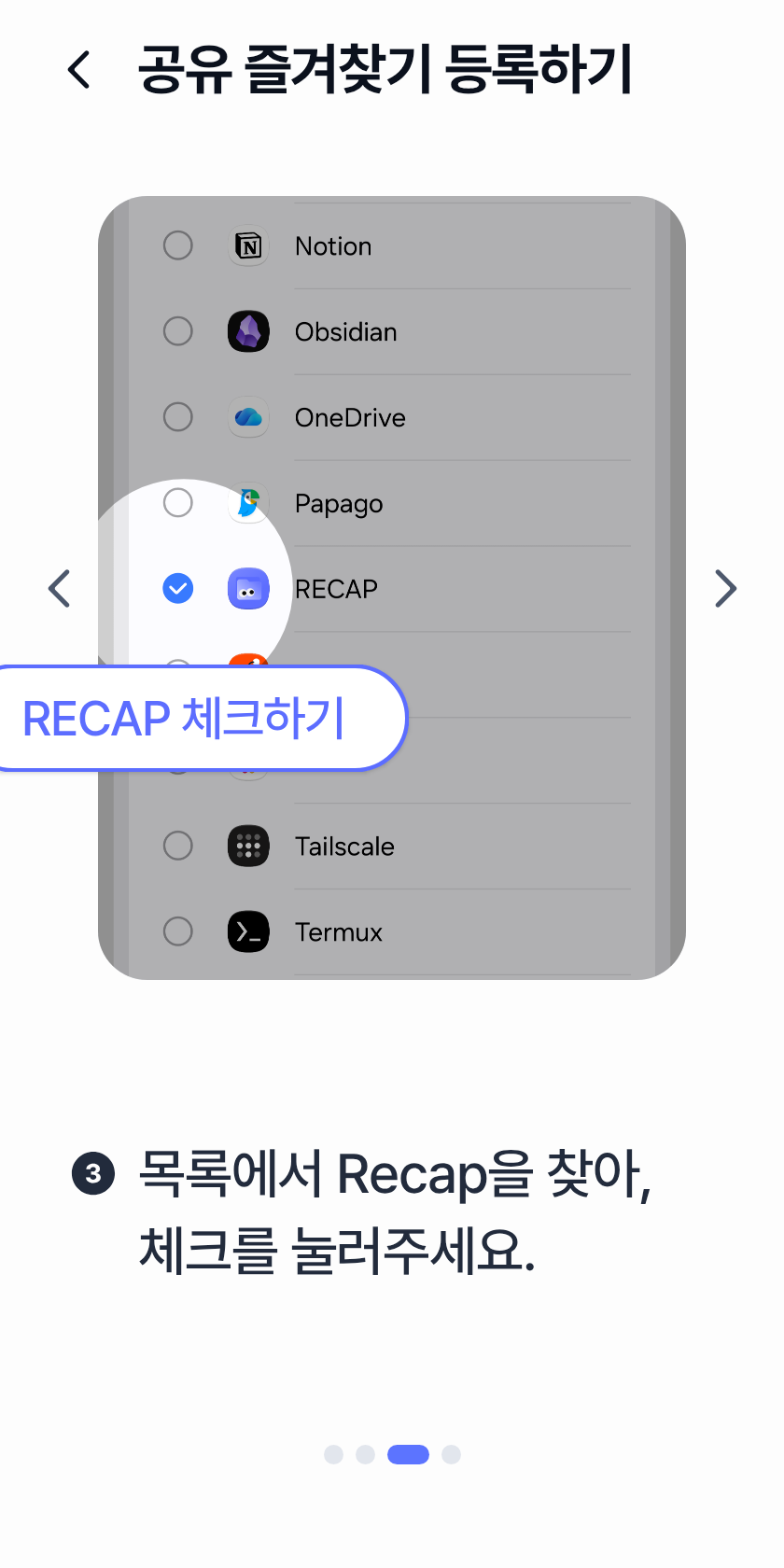
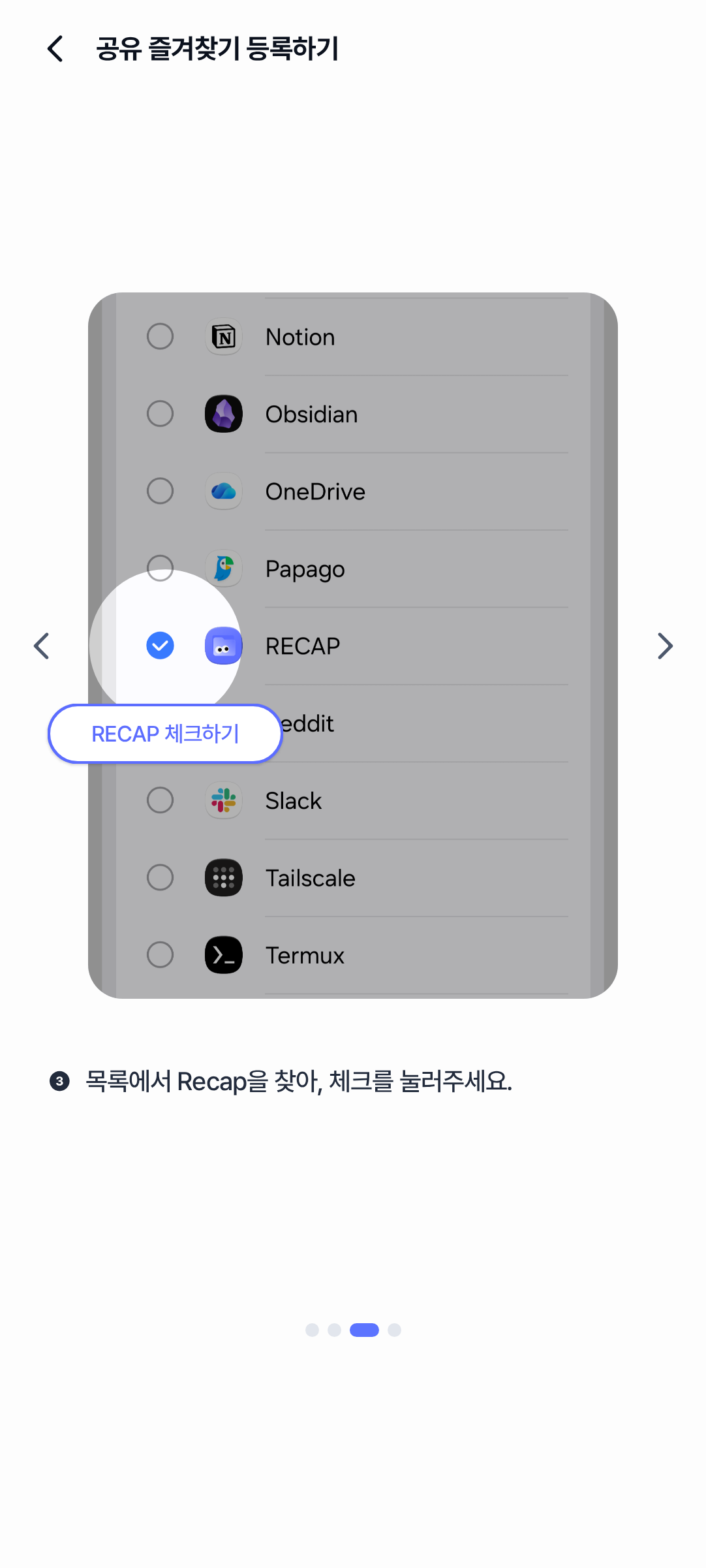
MAJOR HORIZONTAL_OVERFLOW onboarding-003 onboarding / OnboardingAddToFavoriteGuideScreen Step3 RECAP check callout clipped off left edge

On step 3, GuideTouchHighlight places the RECAP 체크하기 speech bubble centered on a left-side hotspot (xFraction 0.146). On narrower widths / larger fonts the bubble extends past the left viewport edge and also overlaps the left pager chevron.

State step3
Test com.chalkak.recap.feature.onboarding.screen.OnboardingAddToFavoriteGuideScreenStep3Screenshot
Components GuideTouchHighlight, RecapSpeechBubble, GuideChevronButton
Root cause file feature/onboarding/src/main/java/com/chalkak/recap/feature/onboarding/screen/OnboardingAddToFavoriteGuideScreen.kt
Probable root cause Absolute bubble offset from a left-side hotspot is not clamped to the available page width, so enlarged bubbles overflow horizontally.
Fix layer SCREEN · Confidence HIGH · VM confirmation False

Evidence

  • Left edge of RECAP 체크하기 bubble is cut off on 320x640/font150.
  • GuideTouchHighlight computes x = holeCenterX - bubbleWidth/2 without clamping to parent bounds; step3 hotspot is near the left (xFraction=0.146).

Failing screenshots

onboarding-003 320x640-font150
Most severe failing · 320x640-font150 · 320x640 · fontScale 1.5
onboarding-003 healthy
Healthy comparison

All occurrence previews: 320x640-font150

MAJOR OVERLAP onboarding-001 onboarding / OnboardingLandingScreen Start chip speech bubble overlaps simple-login divider

The absolute-offset RecapSpeechBubble (5초만에 시작하기) collides with the 간편로그인 divider/label above the Kakao button as fontScale grows.

State default
Test com.chalkak.recap.feature.onboarding.screen.OnboardingLandingScreenScreenshot
Components RecapSpeechBubble, SocialLoginSection, 간편로그인 divider
Root cause file feature/onboarding/src/main/java/com/chalkak/recap/feature/onboarding/screen/OnboardingLandingScreen.kt
Probable root cause Fixed absolute bubble offset (LandingBubbleKakaoGap) does not adapt when bubble height and nearby caption typography grow with fontScale.
Fix layer SCREEN · Confidence HIGH · VM confirmation False

Evidence

  • At 320x640/font130 and 412x915/font150 the speech bubble visually covers 간편로그인 and the divider line.
  • OnboardingLandingScreen.kt positions RecapSpeechBubble with a fixed LandingBubbleKakaoGap (90.dp) absolute offset from the Kakao button, so larger bubble/text height collapses into the SocialLoginSection header.

Failing screenshots

onboarding-001 320x640-font130
Most severe failing · 320x640-font130 · 320x640 · fontScale 1.3
onboarding-001 healthy
Healthy comparison

Additional failing configs: 412x915-font150 (412x915 fontScale 1.5)

All occurrence previews: 320x640-font130, 412x915-font150

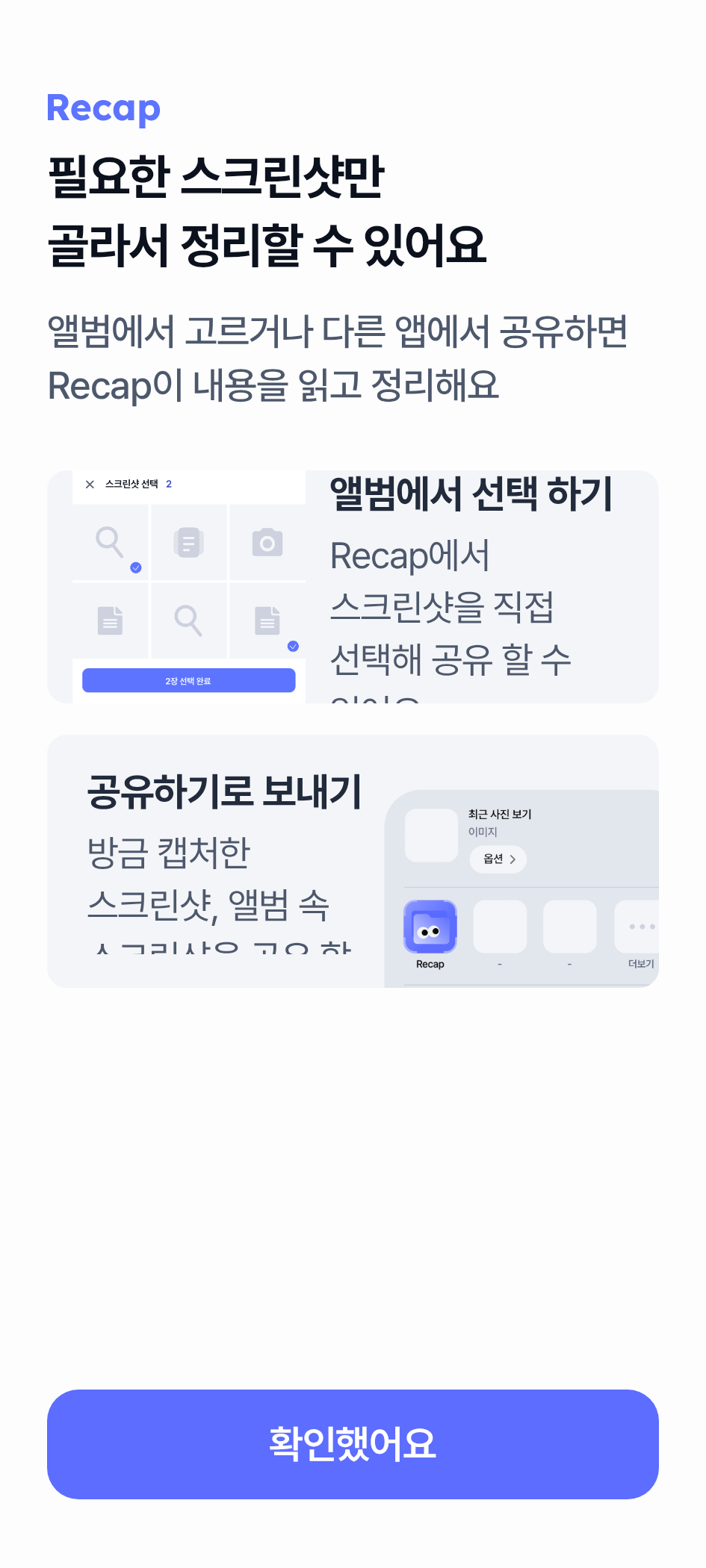
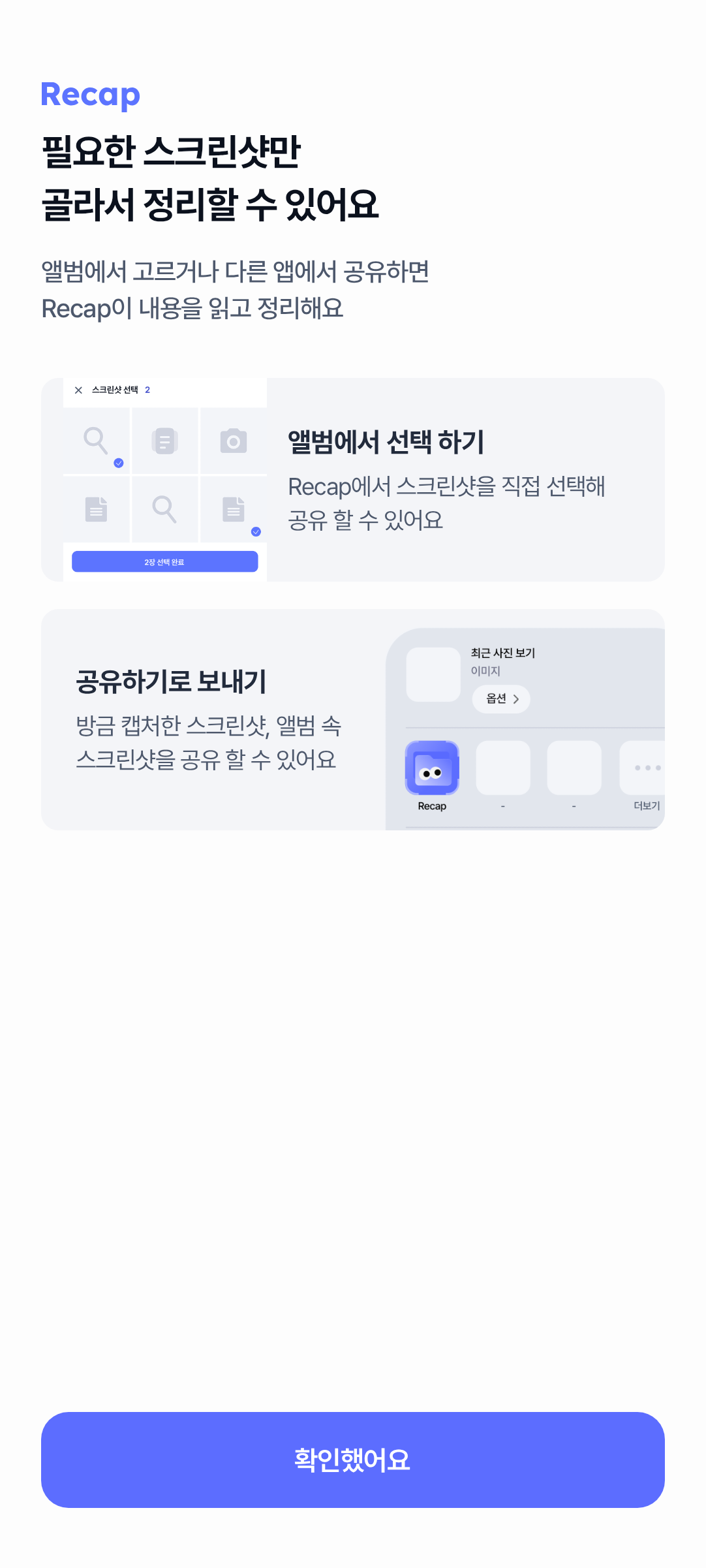
MAJOR CLIPPING onboarding-002 onboarding / OnboardingUploadMethodGuideScreen Fixed-height upload method cards clip description text

Album-select and share-send guide cards use fixed heights. As fontScale increases, title/description text is clipped at the card edge (horizontal and/or vertical), making feature copy unreadable. Even some fontScale 1.0 compact widths clip description lines.

State default
Test com.chalkak.recap.feature.onboarding.screen.OnboardingUploadMethodGuideScreenScreenshot
Components AlbumSelectGuideCard, ShareSendGuideCard, UploadMethodGuideCardText
Root cause file feature/onboarding/src/main/java/com/chalkak/recap/feature/onboarding/screen/OnboardingUploadMethodGuideScreen.kt
Probable root cause Fixed-height cards cannot grow with scaled typography; clipped Column text overflows the card bounds.
Fix layer SCREEN · Confidence HIGH · VM confirmation False

Evidence

  • Card description lines are cut mid-glyph by the card clip boundary on compact and high fontScale renders.
  • OnboardingUploadMethodGuideScreen.kt uses UploadMethodGuideCardHeight = 129.dp and AlbumSelectGuideImageSize = 119.dp fixed heights with clip(RoundedCornerShape).

Failing screenshots

onboarding-002 360x800-font130
Most severe failing · 360x800-font130 · 360x800 · fontScale 1.3
onboarding-002 healthy
Healthy comparison

Additional failing configs: 320x640-font100 (320x640 fontScale 1); 320x640-font130 (320x640 fontScale 1.3); 320x640-font150 (320x640 fontScale 1.5); 360x800-font150 (360x800 fontScale 1.5); 412x915-font130 (412x915 fontScale 1.3)

All occurrence previews: 320x640-font100, 320x640-font130, 320x640-font150, 360x800-font130, 360x800-font150, 412x915-font130

MAJOR OVERLAP organize-001 organize / OrganizeAnalysisStatusRoute / OrganizeProgressContent Progress speech bubble overlaps pinned cancel CTA on compact short screens

On 320x640 at fontScale 1.5, the RecapSpeechBubble under the progress bar overlaps the pinned bottom cancel button (정리 취소). Bubble border and lower bubble text are obscured by the CTA. Healthy at the same size with fontScale 1.0/1.3 and on taller sizes (360/412).

State Progress (notificationsEnabled=true, progress=0.65)
Test com.chalkak.recap.feature.organize.OrganizeAnalysisStatusProgressScreenshot
Components OrganizeProgressContent, RecapSpeechBubble, OrganizeAnalysisStatusScaffold RecapButton (cancel)
Root cause file feature/organize/src/main/java/com/chalkak/recap/feature/organize/OrganizeAnalysisStatusRoute.kt
Probable root cause Pinned bottom CTA plus non-scroll centered Progress Column with fixed 240.dp illustration and fixed spacers; no scroll or content bottom padding to keep the speech bubble clear of the button on short viewports under large fontScale.
Fix layer SCREEN · Confidence HIGH · VM confirmation False

Evidence

  • 320x640-font150 screenshot shows the speech bubble bottom edge and lower text colliding with the lavender cancel button.
  • OrganizeAnalysisStatusRoute pins RecapButton at Alignment.BottomCenter with no reserved content bottom inset for Progress.
  • OrganizeProgressContent is a non-scroll Column with fixed IllustrationSize 240.dp and fixed vertical spacers, centered via Alignment.Center with ProgressContentOffsetY (-20.dp).
  • At higher fontScale, wrapped title/description/bubble text increases content height until the bubble intersects the pinned CTA.

Failing screenshots

organize-001 320x640-font150
Most severe failing · 320x640-font150 · 320x640 · fontScale 1.5
organize-001 healthy
Healthy comparison

All occurrence previews: 320x640-font150

MAJOR CLIPPING settings-001 settings / UsageGuideScreen ShareFavoriteGuideCard description clipped by fixed card height

On UsageGuideScreen, the ShareFavoriteGuideCard description text is vertically clipped inside the fixed-height card as fontScale increases. At fontScale 1.3 the trailing portion of the description is already missing; at 1.5 the last line is cut mid-glyph. Healthy baseline (412x915 font100) shows the full description '공유 시트에서 Recap으로 바로 공유할 수 있어요'.

State default
Test com.chalkak.recap.feature.settings.guide.UsageGuideScreenScreenshot
Components ShareFavoriteGuideCard, UsageGuideScreen
Root cause file core/design/src/main/java/com/chalkak/recap/core/design/component/card/ShareFavoriteGuideCard.kt
Probable root cause ShareFavoriteGuideCard hard-codes CardHeight = 115.dp around title + description + illustration reservation; scaled typography exceeds that height and is clipped by the Box.
Fix layer COMPONENT · Confidence HIGH · VM confirmation False

Evidence

  • 320x640-font150: description line inside ShareFavoriteGuideCard is cut mid-glyph at the card bottom edge
  • 412x915-font150: second description line is horizontally sliced through character midpoints
  • ShareFavoriteGuideCard.kt uses Modifier.height(ShareFavoriteGuideCardTokens.CardHeight) with CardHeight = 115.dp and no verticalScroll or heightIn(min=...)
  • UsageGuideScreen body uses verticalScroll, so list content below the fold is reachable; the card clipping is internal to the fixed-height component

Failing screenshots

settings-001 320x640-font150
Most severe failing · 320x640-font150 · 320x640 · fontScale 1.5
settings-001 320x640-font130
Boundary (issue begins) · 320x640-font130 · 320x640 · fontScale 1.3
settings-001 healthy
Healthy comparison

Additional failing configs: 360x800-font130 (360x800 fontScale 1.3); 360x800-font150 (360x800 fontScale 1.5); 412x915-font150 (412x915 fontScale 1.5)

All occurrence previews: 320x640-font130, 320x640-font150, 360x800-font130, 360x800-font150, 412x915-font150

Cross-module patterns

xpat-001: Fixed-height containers clip scaled typography HIGH

Multiple screens use hard-coded container heights that do not grow with fontScale, so title/description text is clipped inside the component even when the parent list may scroll.

Issues onboarding-002, settings-001
Modules onboarding, settings
Common failing configs fontScale >= 1.3 on compact widths
Probable shared layer COMPONENT/SCREEN fixed-height tokens (guide cards)
Evidence onboarding-002 UploadMethodGuideCardHeight 129.dp; settings-001 ShareFavoriteGuideCard CardHeight 115.dp — both clip under elevated fontScale in host screenshots.

xpat-002: RecapSpeechBubble absolute placement collides or overflows under scale HIGH

Screens that position RecapSpeechBubble with absolute offsets or hotspot-centered placement without clamping/adapting for larger bubble size collide with nearby controls or clip at the viewport edge.

Issues onboarding-001, onboarding-003, organize-001
Modules onboarding, organize
Common failing configs 320x640 at elevated fontScale; onboarding landing also fails on wider widths at fontScale 1.5
Probable shared layer COMPONENT RecapSpeechBubble + SCREEN absolute placement
Evidence Landing fixed LandingBubbleKakaoGap; guide step3 left hotspot without clamp; organize Progress pinned CTA without content bottom inset for enlarged bubble.

xpat-003: Single-line ellipsis truncates required labels at compact width + high fontScale MEDIUM

Required primary labels that use maxLines=1 with TextOverflow.Ellipsis become incomplete on compact widths, reducing readability of category identity.

Issues collection-001
Modules collection
Common failing configs collection from fontScale 1.3 on 320dp grid cells
Probable shared layer SCREEN/COMPONENT single-line text overflow contracts
Evidence collection-001 fixed 3-column grid cells ellipsize category titles.

Passed modules

Blocked modules

No blocked modules.

Limitations